For legal-directory submissions

Chambers and Partners Legal 500 submissions, done in seconds — not by hand.

LegalConverter moves your filled submission data between Chambers and The Legal 500 — and referee spreadsheets — both ways, with formatting intact. 100% offline: your confidential client data never leaves the computer.
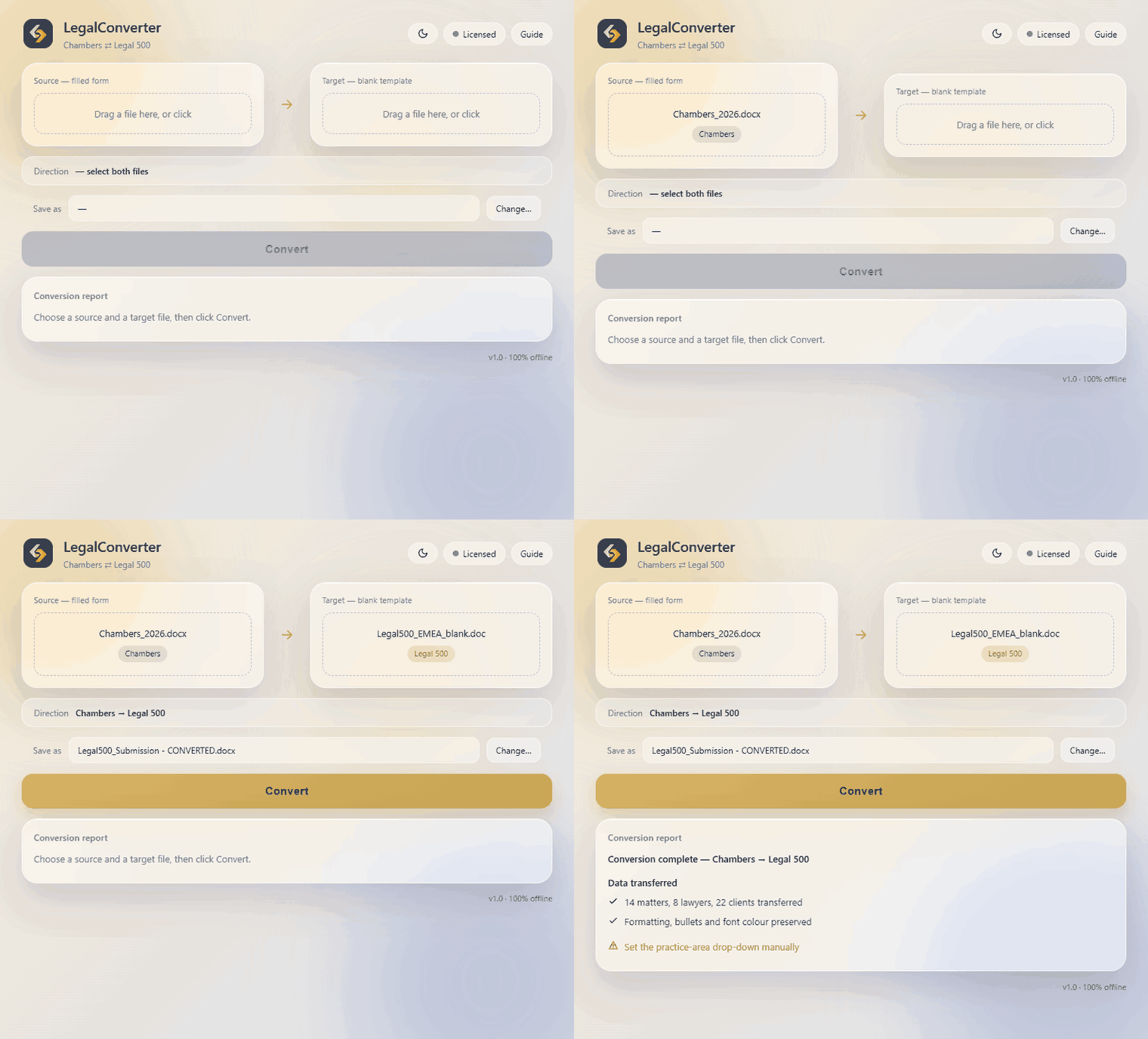
100% offline No install · no admin rights Windows Chambers ⇄ Legal 500
LegalConverter app, light mode
LegalConverter app, dark mode
What it does

Directory submissions, converted automatically

Purpose-built for the Chambers and Legal 500 submission workflow, end to end.

Two-way conversion

Chambers ⇄ Legal 500, in both directions — Word submission forms and referee spreadsheets (.xlsx). Pick a filled form and a blank template; every field is mapped and filled.

Both Legal 500 templates

Works with both the current Legal 500 form and the older table-based “earlier version of Word” template — the tool detects which one you’ve loaded and fills it correctly.

Formatting & colour preserved

Bold, underline and font colour (e.g. a red “CONFIDENTIAL”), bullets and multiple people/firms per matter carry across both ways. Blank rows are removed and each work highlight starts on its own page.

Carry-forward (new year)

Reuse last year’s submission to pre-fill this year’s blank form — with a checklist of what to refresh: stale matters, ongoing statuses, and “new” clients.

100% offline

No cloud, no AI, no telemetry — nothing is ever uploaded. Built for confidential client data and firm IT/risk policies. GDPR-friendly by design.

No install, no admin

A single portable .exe. Runs on locked-down firm laptops without administrator rights — just double-click and go.

Three clicks

How it works

From a finished form in one format to a filled form in the other — in under a minute.

1

Load your filled form

Drop in the completed Chambers or Legal 500 submission you already have.

2

Load the blank template

Add the empty template of the other format. The direction is detected automatically.

3

Convert

Get a new, fully filled file — plus a report of anything worth reviewing.

The result is a clean, ready-to-send file — formatting and font colour preserved, blank rows removed, and each work highlight on its own page.

Security & confidentiality

Your data never leaves your device

Submission forms are full of confidential client names and unpublished matters. LegalConverter is built so none of it is ever exposed.

  • No internet used or requiredWorks fully offline — disconnect the network and it still runs.
  • Nothing sent to any server, cloud or AINo uploads, no accounts, no telemetry, no tracking.
  • Confidential matters clearly flaggedMarked in the output so unpublished work is never mistaken for publishable.
  • Originals are never modifiedThe output is always a brand-new file — your source stays untouched.

Offline by design

No connection. No cloud. No exceptions. The whole tool is a single file that runs locally on a firm laptop.

Enterprise add-on · AI gap-fill

Connect it to your firm’s AI — like Microsoft Copilot

A few details aren’t in the document you’re converting — they live in your firm’s knowledge (industry sector, deal values, whether a client is “new”). The Enterprise add-on lets your firm’s own AI assistant — most often Microsoft Copilot — fill those in from what your firm already knows. The conversion itself still runs 100% offline, and we set up the connection for you — there’s nothing for you to configure.

1

We spot the gaps

LegalConverter flags the few fields the new form needs that weren’t in your document — like industry sector, deal value, or whether a client is new.

2

Copilot fills them in

Your firm’s AI assistant — usually Microsoft Copilot — answers them from what your firm already knows, such as past submissions and your own records, without anything leaving the firm.

3

Filled in for you

Those answers are placed straight into the right spots on the form. Your team reviews everything before it’s sent.

We connect it to the AI you already use

You don’t install anything new or change how your firm works. We set up the link between LegalConverter and your firm’s AI assistant — for most firms that’s Microsoft Copilot — so it simply works alongside the tools you already use. Your firm keeps full control of both the AI and the data, the whole time. We handle the setup for you — there’s nothing for your team to build.

  • Microsoft Copilot
  • Microsoft 365 & Azure
  • Or any AI your firm uses
  • No new app to learn
  • Runs inside your firm — never on our servers
  • The converter itself stays 100% offline
  • Works with Copilot or any AI your firm uses
  • Your team approves every submission before it’s sent
Why not just an AI prompt?

An AI model rewrites. LegalConverter transfers — exactly.

An AI-only promptLegalConverter
AccuracyParaphrases, drops or invents — and can break the form’s structure and formattingCopies every field verbatim — structure, bullets and colour intact
ConsistencyA different result each run — not reproducible or auditableDeterministic — identical, reviewable output every time
ConfidentialitySends the full confidential submission to the model100% offline — nothing ever leaves the computer
Speed & costSlow and token-heavy on a large formInstant, and free per conversion

In short: an AI rewrites; LegalConverter transfers — exactly — which is why the gap-fill above uses your firm’s AI only for the fields not in the source, never for the conversion itself.

Who it’s for

Built for the people who work on legal directories

BD & Marketing teams

Directories / submissions specialists who prepare rankings forms across many practices and markets.

Submissions agencies

Consultants who handle Chambers and Legal 500 submissions at scale for multiple firms — fastest return on every saved hour.

International & offshore firms

The more practice areas and jurisdictions you file, the more re-keying LegalConverter removes.

Pricing

Start with a free trial. Then receive a quote tailored to your firm.

Try every feature on your own forms first. Licensing is priced individually by firm size and team — no fixed list price.

Free trial

Free · time-limited
Evaluate the full product on your own submissions.
  • All features unlocked
  • Conversion + carry-forward + all templates
  • No card required
Request trial

Team

By quote · annual
For a single BD professional or a small in-house team.
  • Two-way conversion (Word + referee .xlsx)
  • Carry-forward & formatting/colour preserved
  • Email support & updates
Request a quote

Firm

By quote · annual
For a department or firm-wide rollout, multiple seats.
  • Everything in Team
  • Multiple seats · firm-wide licence
  • Priority email support
  • AI gap-fill · Enterprise add-on
Request a quote

Agency

By quote · tailored
For submissions agencies & consultancies — many clients, high volume.
  • Everything in Firm
  • Volume & multi-client licensing
  • Priority support & onboarding
  • AI gap-fill · Enterprise add-on
Request a quote

AI gap-fill Enterprise add-on

Some fields aren’t in the source document — industry sector, the Legal 500 practice choice, deal values, “new client?”. With the Enterprise add-on, your firm’s own AI assistant — usually Microsoft Copilot — fills those from your knowledge, and LegalConverter writes them in. The tool itself stays 100% offline — the AI step runs in your environment, never ours. We connect the add-on to your firm’s AI model for you. Available on the Firm and Agency plans.

Every plan starts with a free trial, then pricing tailored to your firm’s size and team — get in touch for a quote.

Questions

Frequently asked

Does it really work offline?
Yes — completely. No internet connection is used or required. You can disconnect the network entirely and LegalConverter keeps working.
Is my data safe?
Nothing leaves your computer: no cloud, no AI, no telemetry, no accounts. Everything is processed locally, which makes it suitable for confidential client data and strict firm IT/risk policies.
Which directories and files are supported?
Chambers and Partners and The Legal 500 — the Word submission forms (including both the current and the older table-based Legal 500 template) and the referee spreadsheets (.xlsx), in both directions.
Does it need installation or admin rights?
No. It’s a single portable .exe that runs on locked-down firm laptops without administrator rights — just double-click it.
What happens to confidential matters?
They’re transferred and clearly flagged in the output, so unpublished work is never mistaken for publishable.
Why not just upload the file to an AI model and prompt it to convert it?
Three reasons. Confidentiality — that would send a full, unpublished submission (confidential client names and matters) to an external model; LegalConverter stays 100% offline and nothing ever leaves the computer. Accuracy — a general model rewrites, and can drop, reorder or invent content, with output that isn’t reproducible; LegalConverter transfers each field deterministically into the exact Chambers / Legal 500 control, preserves formatting, bullets and font colour, expands repeating sections (extra matters, lawyers, clients) and produces the same result every time — auditable, for a submission a partner signs off. Speed & cost — it’s instant and free per conversion, where a 20-matter form is slow and token-heavy for a model. In short: an AI rewrites; LegalConverter transfers — exactly.
The Enterprise “AI gap-fill” uses AI — doesn’t that break the offline promise?
No. The converter stays 100% offline and never connects to anything. AI gap-fill is an optional Enterprise add-on that fills fields which aren’t in the source document — and the AI runs entirely inside your own environment — your firm’s own AI assistant, usually Microsoft Copilot — not ours. LegalConverter only reads and writes local files; it never sends your data anywhere. The base plans have no AI at all.

Get your free trial of LegalConverter

See how much of your submission season you can hand back to your team. Tell us a little about your firm and we’ll set you up.

Request a free trial